FAQ / Troubleshooting
Table of Contents
- Can I use this on Steam/Epic?
- Can I use this on Steam Deck/Linux/Mac?
- Can I use this alongside text/blcm mods?
- Is it safe to install the SDK?
- My game is crashing immediately on starting / after hitting play in the launcher.
- After launching I get a pop up that just says
[...]\binaries\win32\plugins\pyunrealsdk.dll - I installed the SDK but I still don’t see the mod menu.
- I tried installing a
.sdkmod, but it’s not appearing in the mod menu - I tried extracting a mod zip, but it’s not appearing in the mod menu
- Tilde isn’t opening the console / I want to use a different console key
- How do I unbind a Keybind?
- What does it mean if a mod’s a legacy mod?
- Why do some SDK mods disable when I restart the game, when others stay enabled?
Can I use this on Steam/Epic?
Yes, the SDK works across all stores.
Can I use this on Steam Deck/Linux/Mac?
Yes, through a compatibility layer. The SDK only works on a Windows executable, but you can just run that version on Linux/Mac instead.
The official Linux/Mac releases are rather outdated, they don’t include all the latest updates, and you can’t even coop with Windows players due to the version mismatch, so it’s generally recommended to do this anyway.
Steam Deck/Linux
In Steam, force a specific proton version under the game’s Properties 🡒 Compatibility tab. Then on the General tab, set the launch options to:
WINEDLLOVERRIDES="ddraw=n,b" %command% -pf_tricks=vcrun2022
Once you get in game, open console by pressing tilde twice, and double check there’s no proton errors detected. You may have to switch proton builds a few times, the exact builds that work seems to vary between people for reasons we haven’t worked out. Generally though, recent builds of Proton GE seem to have better results - and you may find it easier to install them via ProtonUp-Qt.
Once you manage to load in without any proton errors, you’re all set up, you can continue following all other instructions.
Mac
While we believe it’s possible, we don’t properly understand the process for running the Windows executable on a Mac. If you do, let us know, and we can fill this section in properly.
Can I use this alongside text/blcm mods?
Yup, they’re fully compatible - though as always, specific mods may have issues when used together.
Is it safe to install the SDK?
Depends on what you mean by safe.
Note all the following answers relate to normal, “well behaved” mods. While we’ve never had an incident, a malicious mod could break all the rules.
Will the SDK delete/corrupt my saves?
In general, no. Some specific mods may be more risky.
Mods which add new items/characters generally require a starting new character. Loading an unmodded character with these, or a modded one without them, could possibly cause issues. If you ever make this mistake, the disconnect console command will quit without saving.
Deathtrap Shield is known to cause an error when opening your save in Gibbed’s Save Editor. To fix it, unmark your shield first.
Will I get banned for using the SDK?
No.
The 2K Terms of Service state that, if you use mods to grief/hack their servers, they reserve the right to ban you (from SHiFT, not the game). They also say they’ll ban you if you grief/hack by other means - using mods isn’t the relevant part. In practice, most people recommend staying away from matchmaking because this is essentially never enforced, even in cases it clearly should be.
Will the SDK prevent me getting achievements/give me achievements I haven’t earned?
No. The SDK does not interact with achievements in any way. Specific mods may make getting achievements easier/harder.
Will the SDK give me a virus?
The SDK itself will not - it does occasionally get caught in a scan. To be safe make sure you only ever download it from the official github, linked in the sidebar.
While we’ve never had an incident, it is theoretically possible for SDK mods to contain a virus. SDK mods are not sandboxed, they can run arbitrary code on your system, and we do not actively review their contents. Treat them like installing any other program on your system.
My game is crashing immediately on starting / after hitting play in the launcher.
Try install the latest Microsoft Visual C++ Redistributable.
If you’re running under Proton, you can do this by installing vcrun2022 using protontricks - which you can also do by adding -pf_tricks=vcrun2022 to your launch args.
After launching I get a pop up that just says [...]\binaries\win32\plugins\pyunrealsdk.dll
You installed the latest version of the sdk, but then overwrote it with an older one. Reinstall the latest version of the sdk.
I installed the SDK but I still don’t see the mod menu.
Firstly, double check you installed it in the right place. Make sure you’ve got the right game install folder, and make sure you didn’t accidentally extract it inside one of the game’s folders. You should have a folder <game>/sdk_mods, filled with a bunch of files from the download. If you get the popup like in the last question, you’ll also need to re-install.
If you’ve double checked everything and it still doesn’t show up, try install the latest Microsoft Visual C++ Redistributable as above.
I tried installing a .sdkmod, but it’s not appearing in the mod menu
Firstly, make sure you have the latest version of the sdk. .sdkmod files are only supported on version 3.0 onwards - if you don’t have an sdk_mods folder you’re definitely using an outdated version.
If you’re already running the latest sdk, check console for any errors. Most often, you’re missing one of the mod’s requirements. The requirements should always be listed on the mod page. To fix this, just install/update the requirements.
I tried extracting a mod zip, but it’s not appearing in the mod menu
As above, firstly, check console for any errors.
If there are no error messages, but it’s still not appearing, that’s usually caused by accidentally extracting to a nested folder. If you open the folder you extracted, sdk_mods/<Mod Name>, and just see another folder sdk_mods/<Mod Name>/<Mod Name>, you’ve run into this.
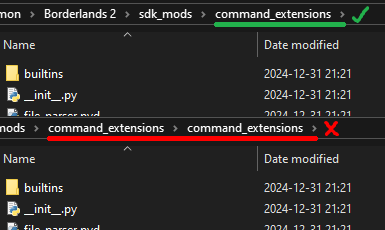
To fix this, simply copy the inner folder and move it up a level. To avoid running into it in future, always drag the folder directly out of the zip file.
Tilde isn’t opening the console / I want to use a different console key
Tilde isn’t quite a standardised key, so on some keyboard layouts a different character sends the same signal to the game. You can check this site for a reference.
OpenBLCMM provides a helpful menu to rebind the console key, under Tools -> INI Tweaks.
Alternatively, you can manually rebind the key. Open the file <my documents>/My games/Borderlands 2/WillowGame/Config/WillowInput.ini in notepad. Search for ConsoleKey=, and replace the key as appropriate.
How do I unbind a Keybind?
Set it to the same thing it was already bound to.
What does it mean if a mod’s a legacy mod?
SDK version 3.0 went through a major rewrite, which significantly changed the best way to write mods. Legacy mods are simply all mods created before this version. Since these were written with an older version in mind, some of their behaviour might now feel a bit off. There might also be a few issues if used in scenarios enabled by the new sdk - for example, in older versions of the SDK you could only enable mods while on the main menu, so some legacy mods might have issues if enabled while in game.
The legacy mod compatibility layer will be removed at some point in the future.
Why do some SDK mods disable when I restart the game, when others stay enabled?
In legacy mods, the mod author had to explicitly turn on auto-enabling. It may simply never have been updated to turn it on.
In modern mods, auto-enabling is on by default, so if a mod doesn’t auto-enable, the author must have deliberately disabled it.